If you work with MySQL databases every day, you already know how much time it can take to move data between MySQL and Excel. Sometimes, you need to share reports with your team in Excel format. Other times, you need to update database records from an Excel sheet. Doing this manually can be frustrating and slow.
That’s where MySQLExporter comes in.
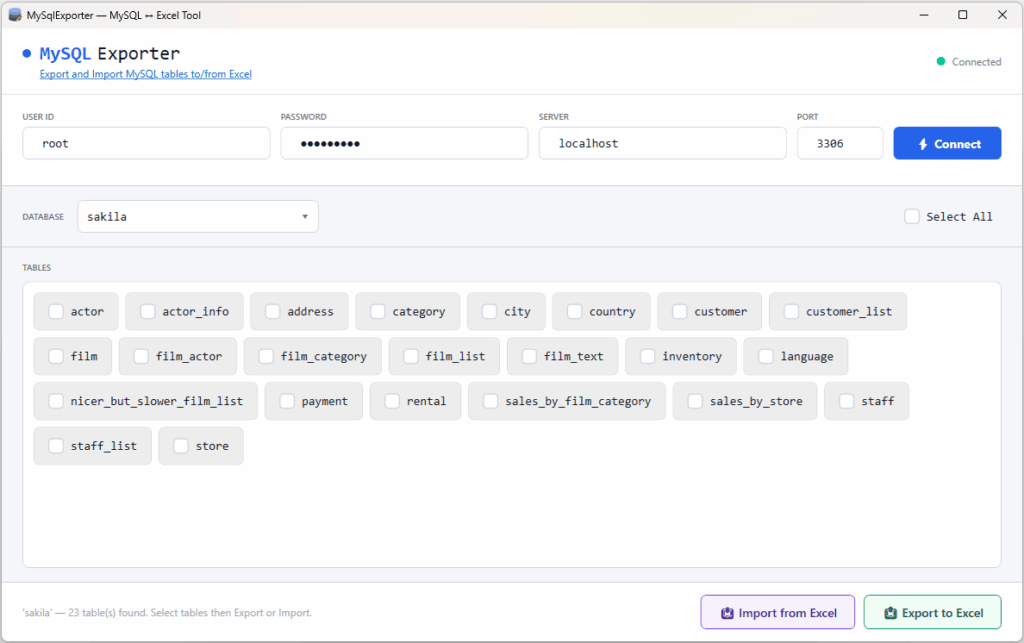
MySQLExporter is a free Windows application designed to make it simple to export MySQL database to Excel and also to import data from Excel to MySQL without complicated steps or technical knowledge.
Why Use MySQLExporter?
Many tools are expensive or difficult to use. MySQLExporter focuses on simplicity. The goal is to help users move data quickly between MySQL and Excel with just a few clicks.
Here are some of the main benefits:
- Simple and clean interface
- Fast data export and import process
- Saves time when handling large tables
- Works great for backups and reports
- Completely free to use
- Perfect for beginners and advanced users
Export MySQL Database to Excel Easily
One of the best features of MySQLExporter is the ability to export MySQL database to Excel quickly and safely.
Instead of copying data manually, the application allows you to export database tables directly into Excel files. This is very useful for:
- Creating reports
- Sharing data with clients or teams
- Data analysis in Excel
- Keeping offline backups
The export process is simple. Connect to your MySQL database, choose the table you want to export, and export the data into an Excel file within seconds.
Import Data from Excel to MySQL without Hassle
Another feature is the ability to import data from Excel to MySQL.
If you already have data stored in Excel spreadsheets, you can move it directly into your MySQL database without writing complex SQL queries. This feature is helpful when:
- Migrating old Excel records into MySQL
- Updating database with an updated Excel file
Simply select the Excel file, and import the data into your MySQL table.
Important Note: The structure of Excel file must match the exported Excel file. In addition, when using this feature to import data from Excel to MySQL, tables with parent/child relationships should be imported in the correct order. Always import the parent tables first before importing the child tables. This helps avoid foreign key errors and keeps the database relationships valid.
Who Should Use MySQLExporter?
MySQLExporter is built for anyone who works with MySQL and Excel regularly. It is especially useful for:
- Developers
- Database administrators
- Small business owners
- Students
- Office employees handling reports
Because the application is free and easy to use, anyone can start using it immediately.
Summary
MySQLExporter is a simple and free Windows application that helps users export MySQL database to Excel and import data from Excel to MySQL quickly and easily. It removes the need for manual work and complicated database tools. With its user-friendly design and fast performance, MySQLExporter is a great solution for anyone who needs to move data between MySQL and Excel efficiently.